


See how a LINE chatbot can automate your business in Asia. We cover building your bot, using advanced features, and integrating it for sales, marketing, and 24/7 support with Botcake.
Introduction
Messaging apps are something we use every day, and in some countries like Japan, Thailand, or Taiwan, the most used app is LINE by a large margin. That presents a huge opportunity for businesses to bring in chatbots. A chatbot is a program that can talk to you like a person, at any time of day or night, to help sell products or provide information. A LINE chatbot is different because it operates right within the LINE app. This is your all-in-one guide to all things about them, from beginner stuff to the most advanced wizardry.
Understanding the Fundamentals of LINE Chatbots
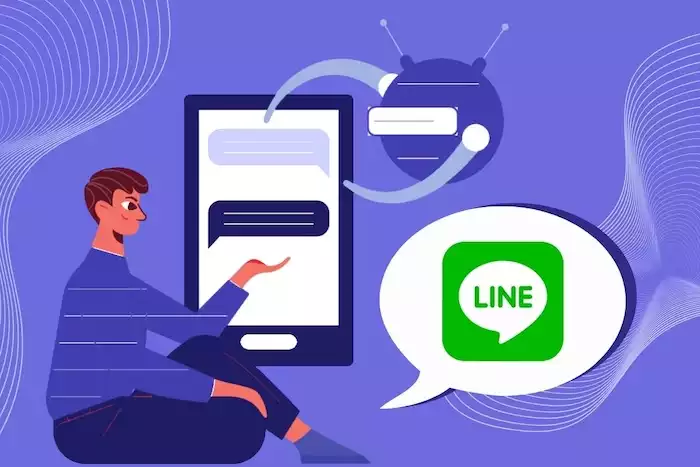
Before you can build your LINE chatbot, it is helpful to know how it works. The entire system is built on a strong foundation from LINE, and it is designed to be flexible for all types of businesses.
The LINE Messaging API: The Backbone of Your Chatbot
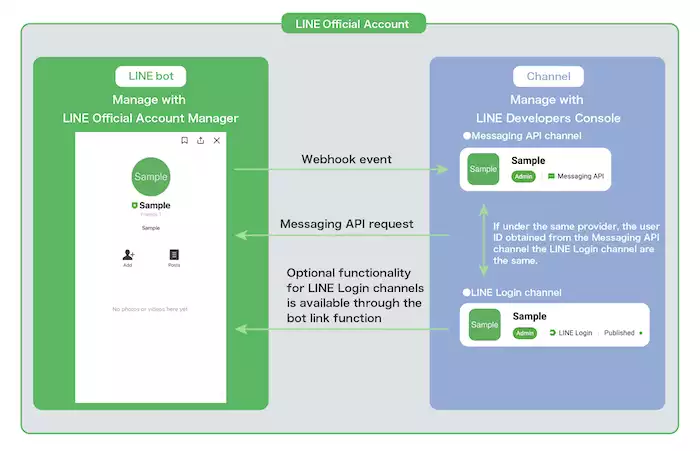
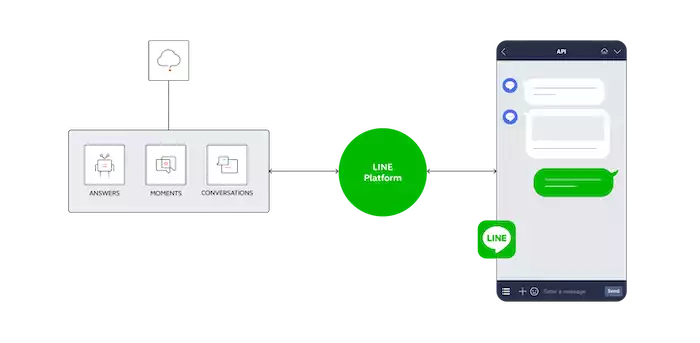
The "engine" that powers every effective LINE chatbot is the An "API" The "engine" of a LINE chatbot is LINE Messaging API.. An API (Application Programming Interface) is a set of rules that enable software to communicate effectively. The Messaging API is the official "bridge" connecting your business software (like Botcake) to the LINE app. This bridge enables your bot to receive user messages and respond with a wide variety of message types.
Types of LINE Chatbots: Beyond Simple Replies
Not all chatbots are the same. They can be very simple or very smart.
-
Rule-based Chatbots: The most basic bots, operating on "if-then" rules (e.g., IF user types 'hours', THEN send hours). They are great for predictable questions but fail if the query is phrased differently.
-
AI-Powered Conversational Chatbots: These smarter bots utilize AI to understand the intent behind a message, even with typos or slang. They are the same technology used in modern conversational AI for sales, learning from interactions, making them ideal for complex sales or support.
-
Hybrid Models: Often the best choice. A hybrid bot uses rules for simple tasks (like menus) but employs AI for complex, open-ended questions.
Key Components of a LINE Chatbot
A good LINE chatbot utilizes several key components to create a seamless user experience.
-
Webhooks: A "doorbell" for your bot. You give LINE a URL to notify when a new message arrives.
-
Message Objects: The different message types your bot can send. This is a LINE strength. Beyond text, your bot can send stickers, images, videos, audio, "carousels" (swipeable cards), and powerful "Flex Messages" (custom layouts).
-
Rich Menus: The persistent, clickable menu at the bottom of the chat. A vital tool, letting users tap buttons like "See Products" or "Talk to an Agent" without typing.
-
LINE Official Account Manager: Your central "control center" to set up your profile, view analytics, and configure your welcome message and Rich Menu.
Building Your First LINE Chatbot: A Step-by-Step Guide
Building a LINE chatbot may seem daunting, but with today's tools, it can be remarkably easy. Here is a simple guide to how it works.
Setting Up Your LINE Official Account
Before you can have a bot, you need a place for it to live. Your first step is to create a LINE Official Account. This is your business's public profile on the app. Complete it with your logo, status message, and business information (address, hours). You can start with a basic account and request verification (a blue badge) later for more trust.
Integrating with the LINE Messaging API
Once your account is created, connect it to the Messaging API in your account manager's developer section. LINE provides two "keys":
-
A Channel Access Token (your bot's password to send messages).
-
A Channel Secret (verifies messages are from LINE).
You will also set up your Webhook URL to tell LINE where to send new messages.
Choosing Your Development Approach
Now you need to build your bot's "brain." You have two main choices.
-
Low-Code/No-Code Platforms: This is the easiest and fastest way, and it is what most businesses should do. Platforms like Botcake give you a visual "drag-and-drop" builder. You do not have to do any complicated coding. The platform handles all the hard technical stuff. You can connect your LINE account and build a smart, AI-powered bot very quickly.
-
Custom Development: For teams with expert developers and unique needs. This involves using SDKs (like Python or Node.js). It offers total control but requires a significant investment of time and money to build and maintain.
Designing Conversational Flows
This is the most important part of building your bot. A "flow" is the path a conversation can take. You have to plan it out, like writing a script for a movie. Think about what your users will want to do (these are their "intents"). For example, a flow for a new customer might be:
-
The user follows your account.
-
Bot sends a Welcome Message.
-
The user taps the "See Products" button on your Rich Menu.
-
Bot sends a swipeable carousel of your top products.
-
The user taps one product.
-
The bot sends the product's details and an "Add to Cart" button.
-
If the customer remains hesitant (e.g., they do not make a purchase), the chatbot will automatically follow up later. This is part of a larger Sales & Support Automation strategy, where everything from answering inquiries to confirming payments happens inside LINE.
Also, plan a "fallback response" for when the bot is confused, like, "Sorry, I didn't understand. Tap below or type 'help' for a human agent."
Advanced Features and Optimization Strategies
A basic LINE chatbot can answer simple questions. An advanced LINE chatbot can help you make more sales and build a loyal following. You can do this by utilizing LINE's special features and integrating your bot with other business tools.
Leveraging Rich Messaging and UI Elements
-
Flex Messages: LINE's most powerful message type, allowing fully custom layouts. They can look like event tickets, receipts, or product showcases.
-
Carousel Templates: Perfect for e-commerce. Display multiple products in a single, swipeable message, each with an image, price, and "Buy Now" button.
-
Quick Replies: Small, temporary buttons to guide users through their next step. They offer easy choices ("Yes," "No," "Main Menu"), making the chat faster.
Integrating with External Systems
The real power of your bot lies in its ability to connect with your other tools.
-
CRM Integration: When your bot interacts with a new customer, it can automatically send that person's information to your Customer Database Program. This integration also allows you to tag, store, and classify data in the CRM, enabling staff to process new leads immediately and ensuring that you capture 100% of your new leads. Additionally, your sales team will have access to the full story when using a CRM like Pancake CRM.
-
E-commerce Platforms: Connect your bot to your Shopify store. This allows the bot to check if a product is in stock or inform a customer about the status of their order.
-
Payment Gateways: You can even let people pay for things right inside the chat. This makes buying super easy.
Personalization and User Segmentation
You should not talk to all your customers in the same way. A good bot platform lets you "segment" (or group) your users. You can have a group for "VIP Customers" and another for "New Customers." This lets you send them different messages. You could send a special "thank you" gift to your VIPs and a "10% off" coupon to new people. This personal touch is very effective and can lead to a 38% increase in sales.
Analytics and Performance Monitoring
A platform like Botcake will give you a report card for your bot. You can track important metrics, such as the number of people using your bot, which buttons they click the most, and the percentage of users who make a purchase. This information is super important. It shows you what is working and what is not, so you can continually improve your bot.
Furthermore, using a platform like Botcake offers additional data management benefits. It allows you to manage customer data, synchronizing it all to one central location, and automatically collect leads directly from your LINE advertising campaigns. Additionally, it features seamless integrations with other major platforms, including Pancake CRM, HubSpot, and Zoho.
Use Cases and Real-Life Applications of LINE Chatbots
Use Case 1: Broadcast Marketing for Promotions & Product Launches
Brands use LINE Broadcast messages to announce flash sales, new product launches, or seasonal campaigns. Messages can be personalized based on user behavior—such as past purchases, viewed products, or category interests.
Benefits:
-
Drives high traffic to online stores or landing pages
-
Higher open and engagement rates compared to email
-
Boosts short-term sales during key promotional periods
Use Case 2: Automated Lead Nurturing with a LINE Chatbot
A LINE chatbot collects customer information, identifies their interests (product category, price range, intent), and automatically sends tailored content such as recommendations, catalogs, or follow-up messages.
Benefits:
-
Reduces workload for sales teams
-
Nurtures leads automatically until they are ready to buy
-
Improves conversion rates from interest → purchase
Use Case 3: Conversational Commerce via 1:1 Messaging
Customers can message the LINE Official Account directly after seeing a product online or offline. Sales agents can view purchase history, tag customer needs, send product bundles or carts, and close the sale within the chat.
Benefits:
-
Seamless, personalized buying experience
-
Higher close rates through real-time consultation
-
Easy cross-selling and upselling based on past behavior
Best Practices for Successful LINE Chatbot Implementation
Building a bot is easy. However, building a good bot that people love requires a solid plan.
-
Have a Clear Goal: First, decide what you want your bot to do. Is its main job to answer questions, get new leads, or sell products? Pick one or two main goals to start.
-
Make it Easy to Use: Your bot should be simple and enjoyable to interact with. Keep its messages short and clear. Use buttons to make it fast. A good bot should feel like a helpful friend. A famous research company, Nielsen Norman Group, says that a simple, guided chat is the best way to make users happy.
-
Always Have a "Human" Button: Your bot will not know the answer to everything. You must provide a clear and easy way for a user to "escape" the bot and speak with a real person. A "Talk to a Human" button should always be in your main menu.
-
Keep Data Safe: Protect your users' information. Be open and honest about what info you are collecting. Always follow the privacy laws in your country.
-
Keep Making it Better: A chatbot is never "finished." You should review your reports on a weekly basis. See what questions the bot is getting wrong. Read the chats. Apply what you learn to update the bot's answers and enhance its intelligence.
Conclusion
LINE chatbot is the new business-consumer communication channel in Asia. Instead of pushing an ad, marketing transforms into a two-way conversation. This helps to instantly provide assistance, share great deals, and make purchasing convenient, especially with multi-platform chatbot software like Botcake that helps businesses automate their marketing and sales activities.